
跳到主要内容
KernelSU 模块

HyperCool - Heat & Battery Fix
不可变 Release 已同步

Cuts overheating and battery drain on Qualcomm and MediaTek phones, with a built-in WebUI to choose what runs.

介绍

HyperCool - Heat & Battery Fix

HyperCool

KernelSU / Magisk module for Qualcomm and MediaTek phones. Less heat, less battery drain, longer battery life. Focused on battery life, not peak performance.


Downloads Stars Android 11+ Latest release

Everything is configured via WebUI and applied on the next boot. Only lightweight keepers run in the background, and only when enabled.

Screenshots
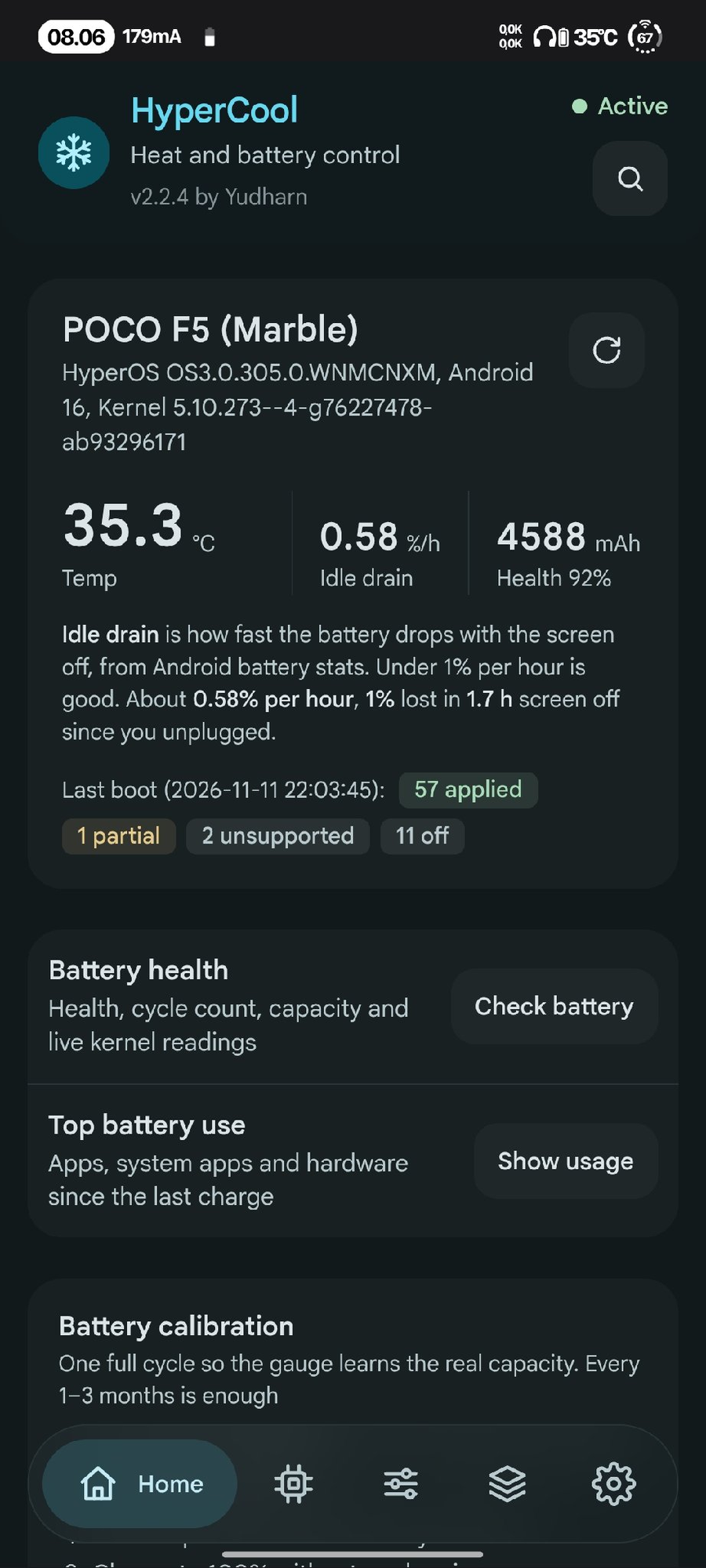
Home
Home
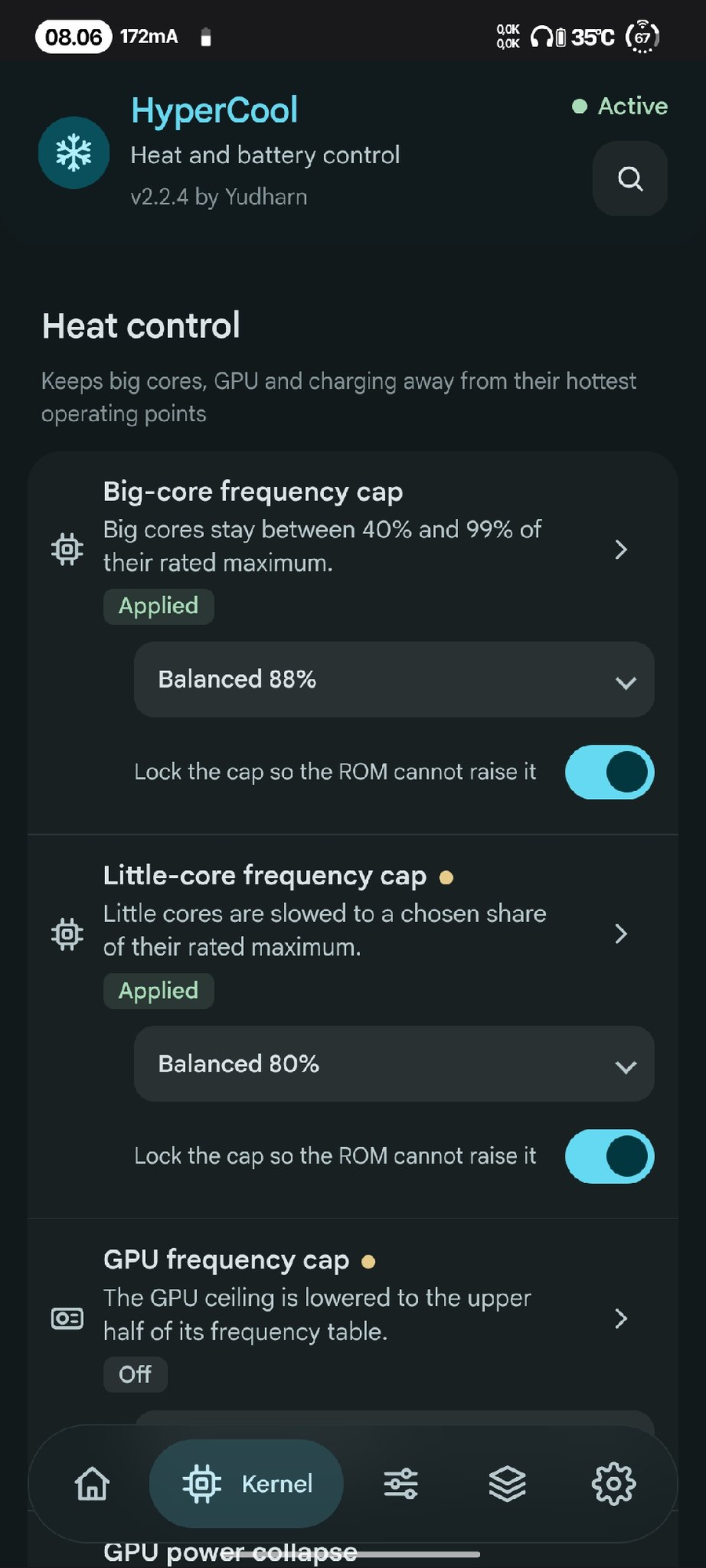
Heat control
Heat control
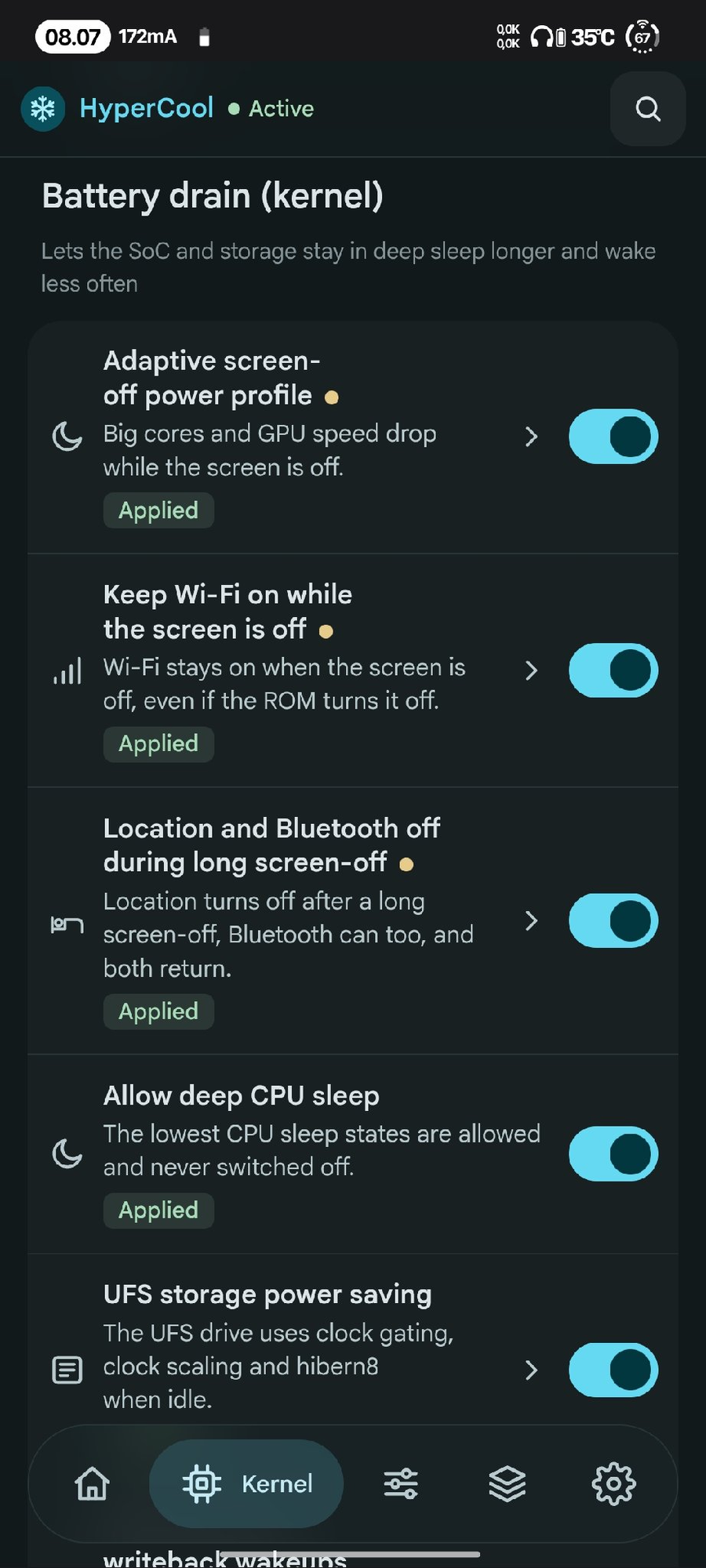
Battery drain (kernel)
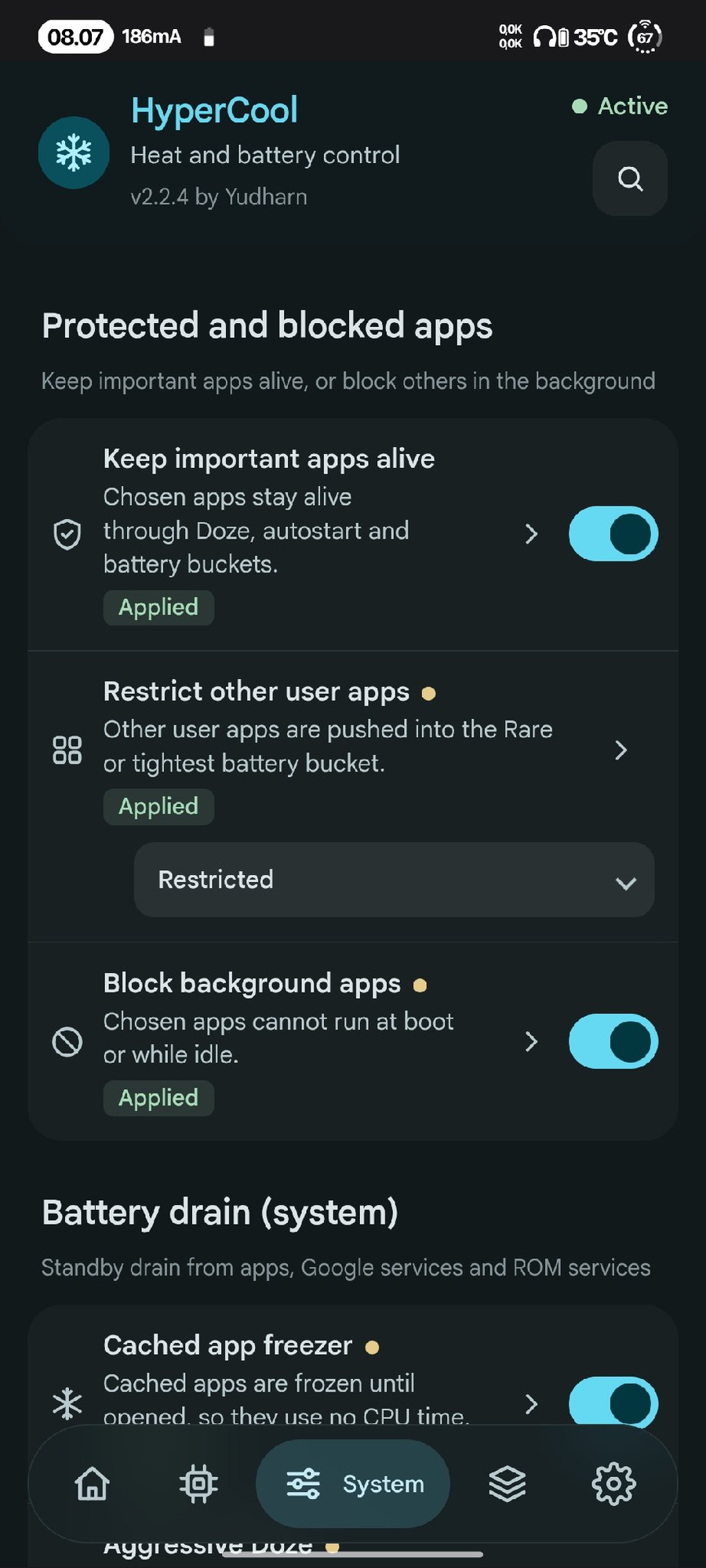
Protected and blocked apps
Protected apps
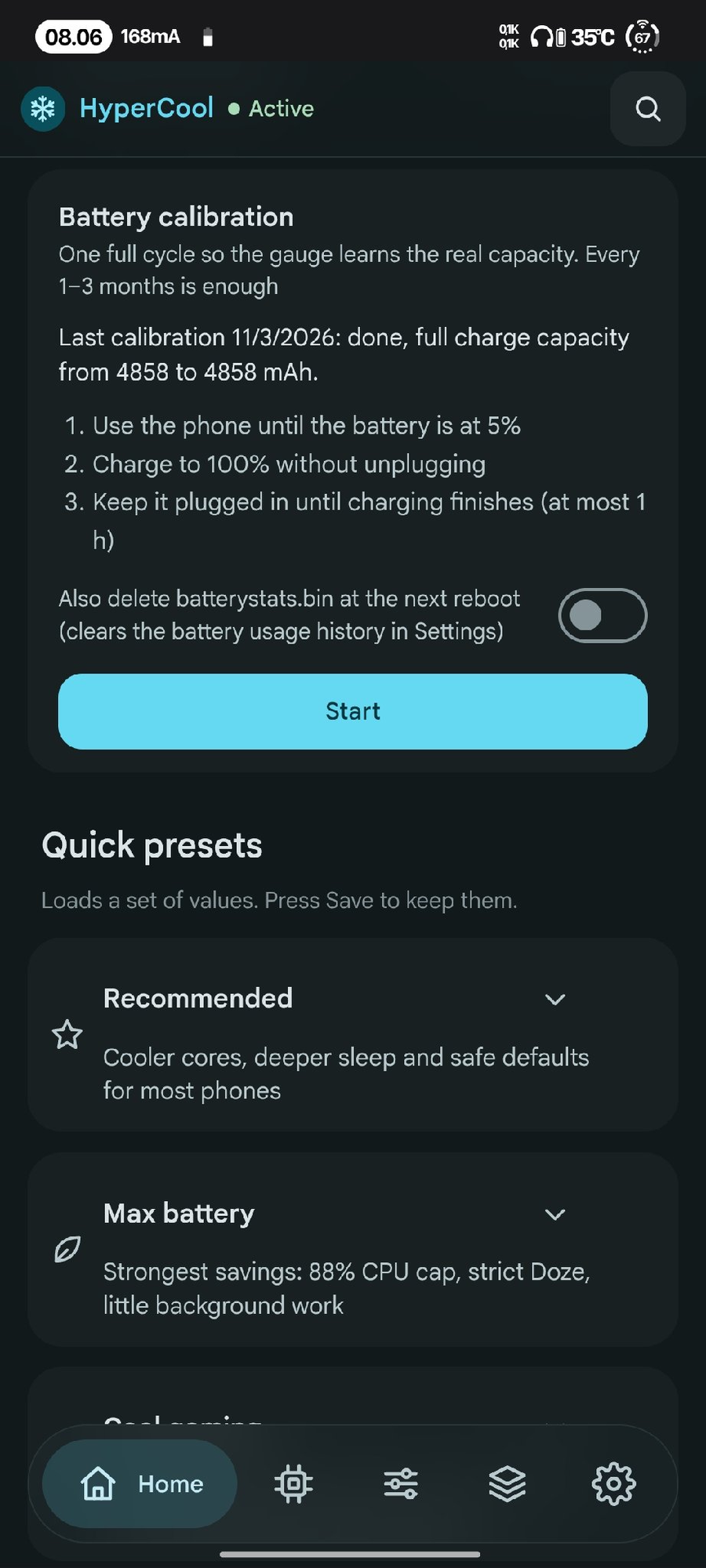
Battery calibration
Battery calibration
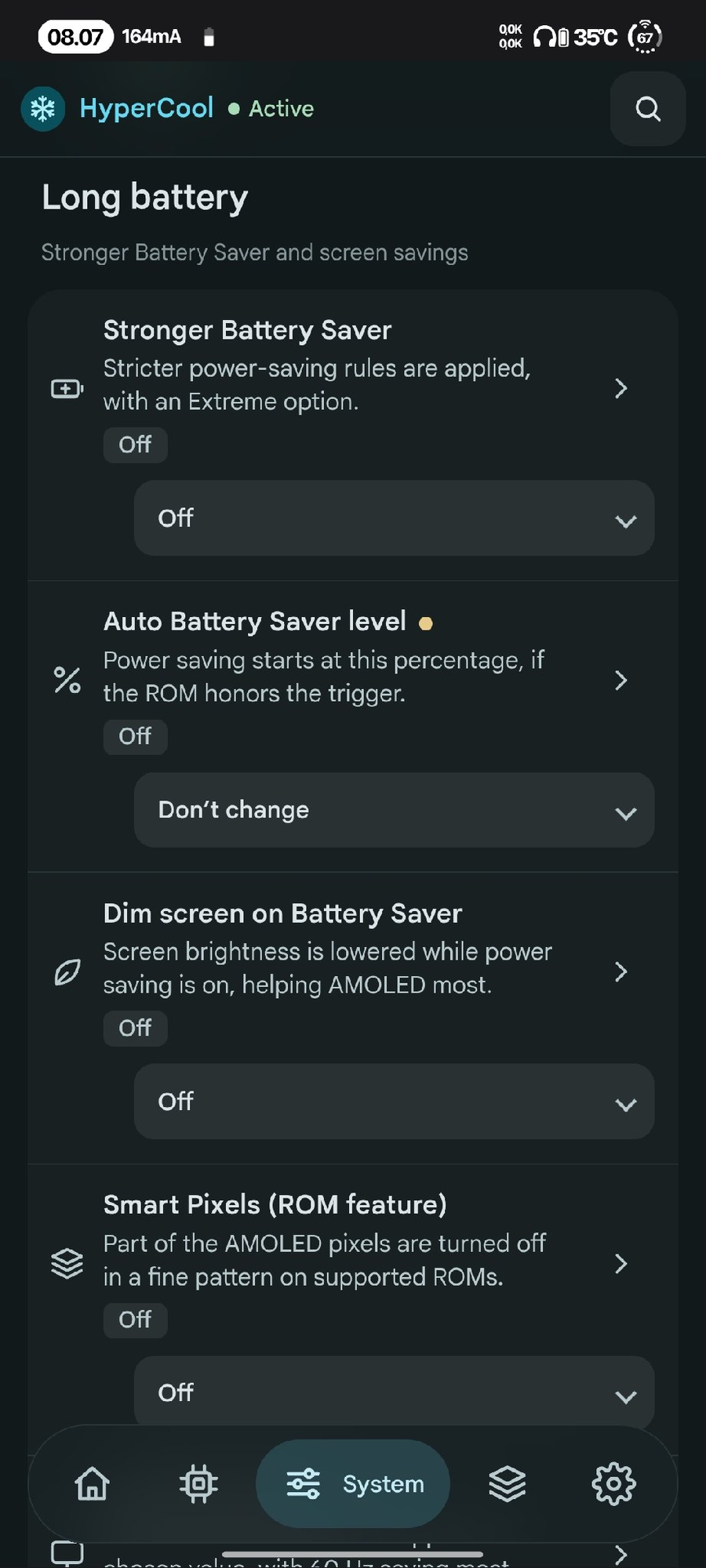
Long battery
Long battery
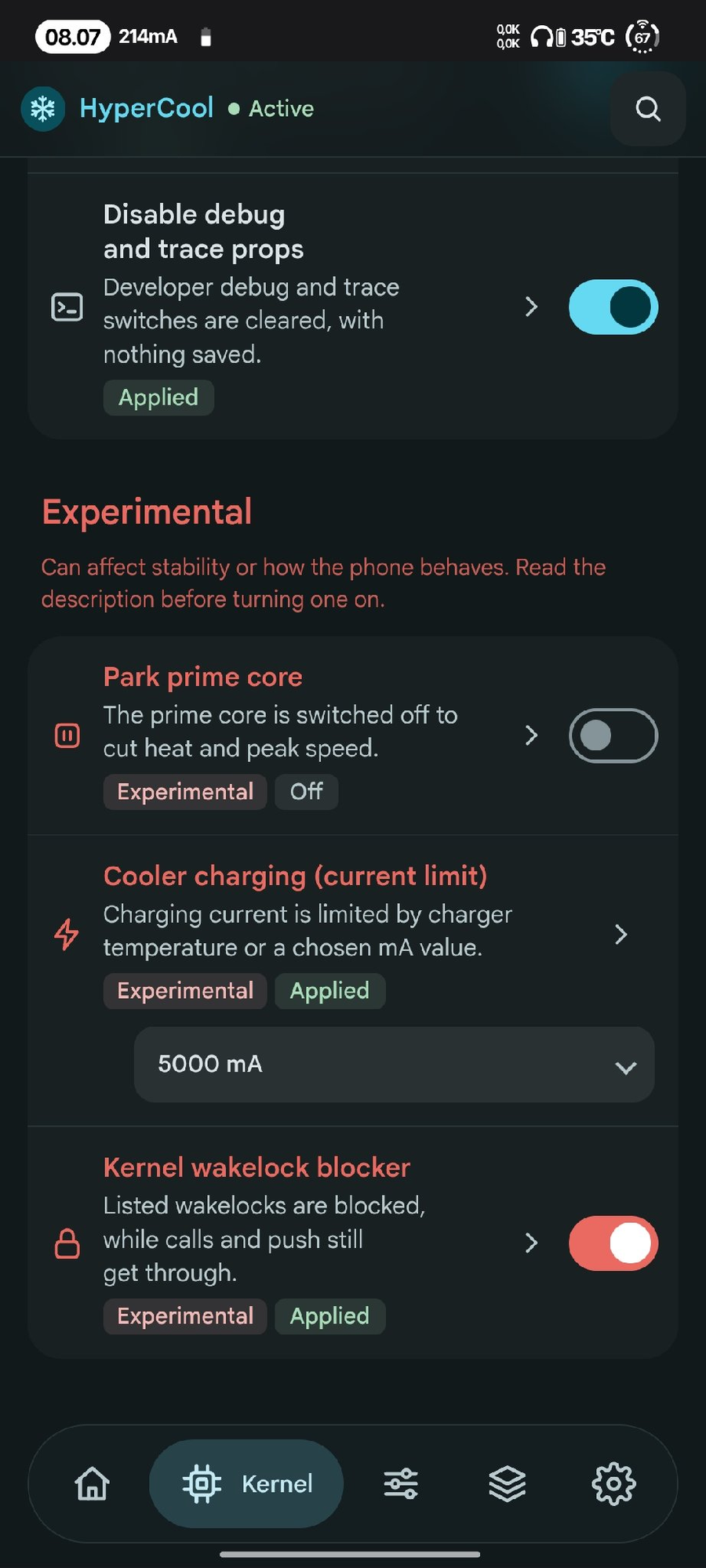
Advanced and experimental
Advanced
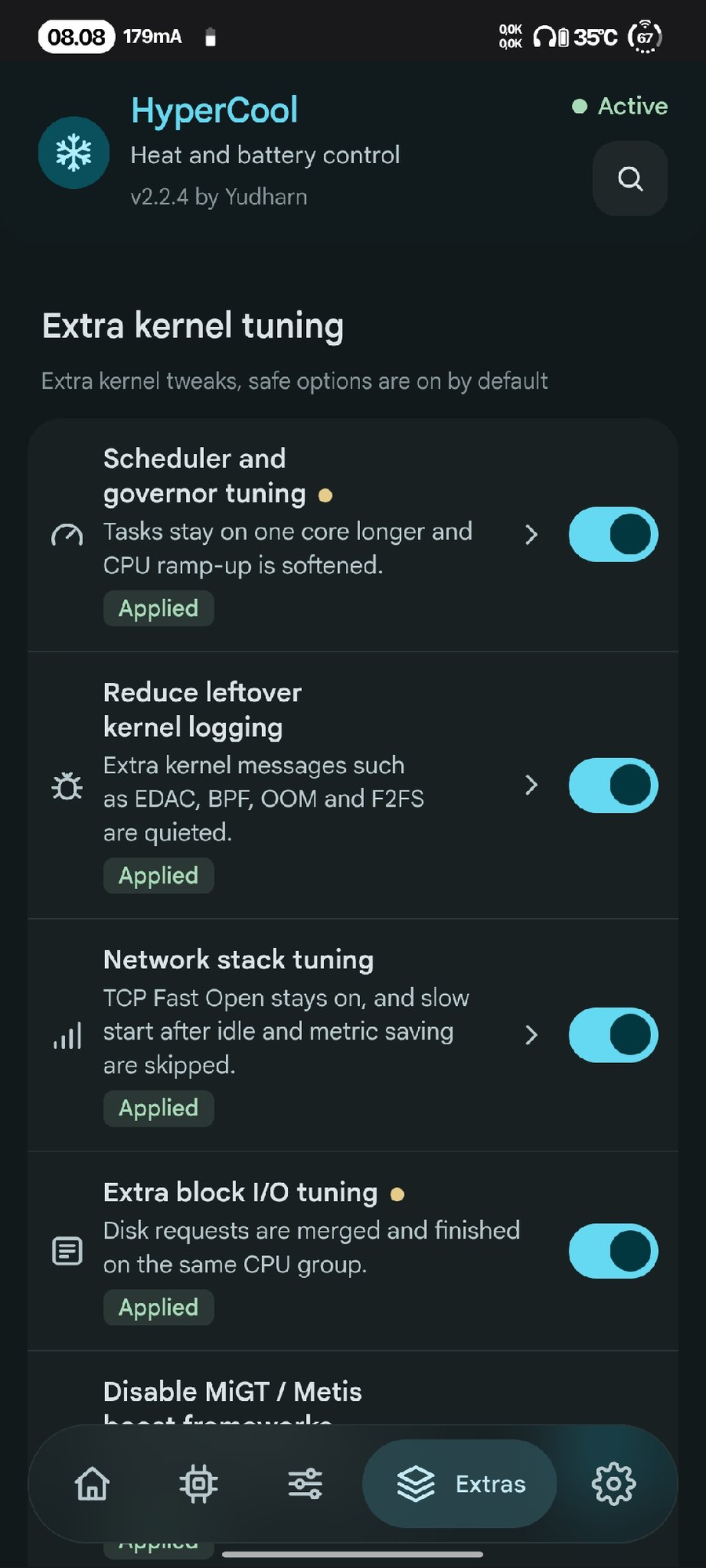
Extra kernel tuning
Extra kernel tuning
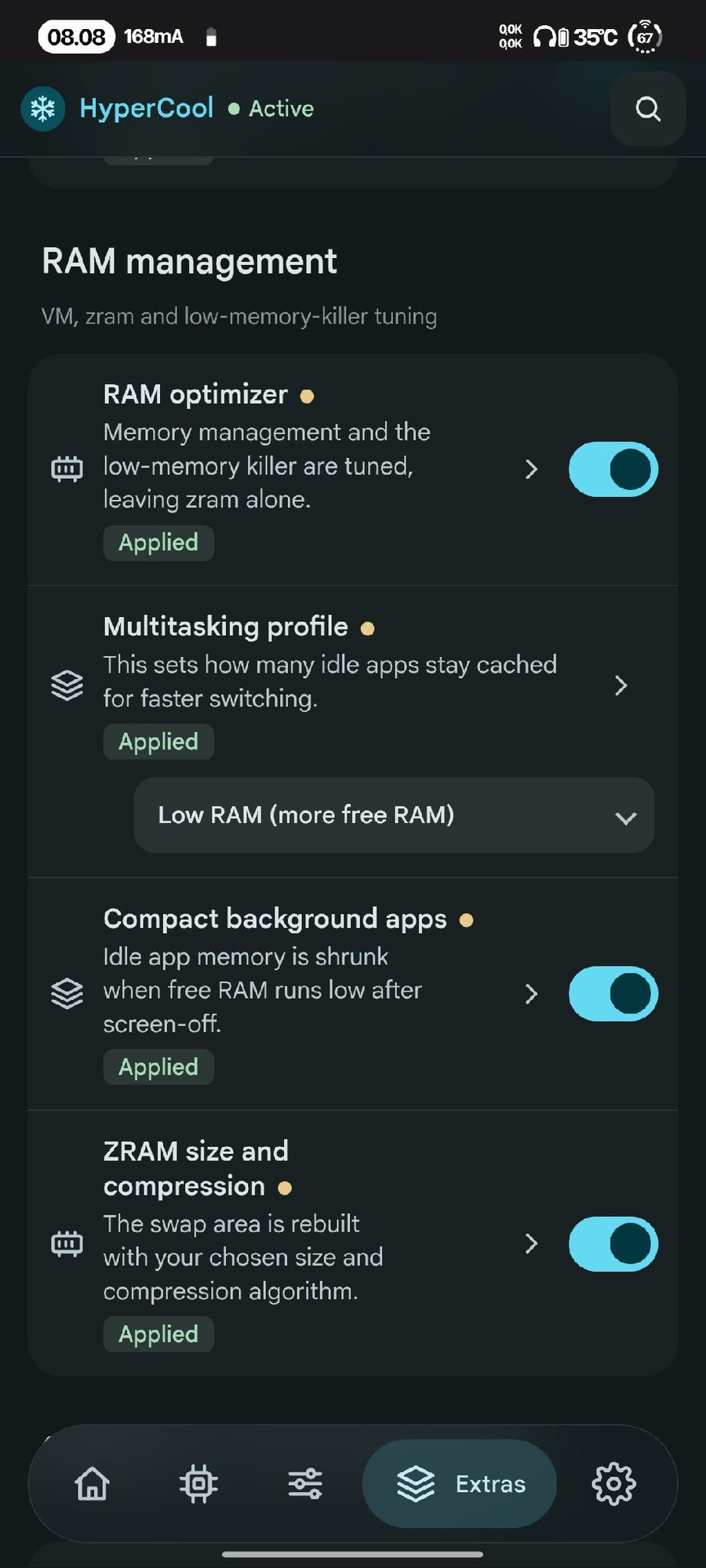
RAM management
RAM management
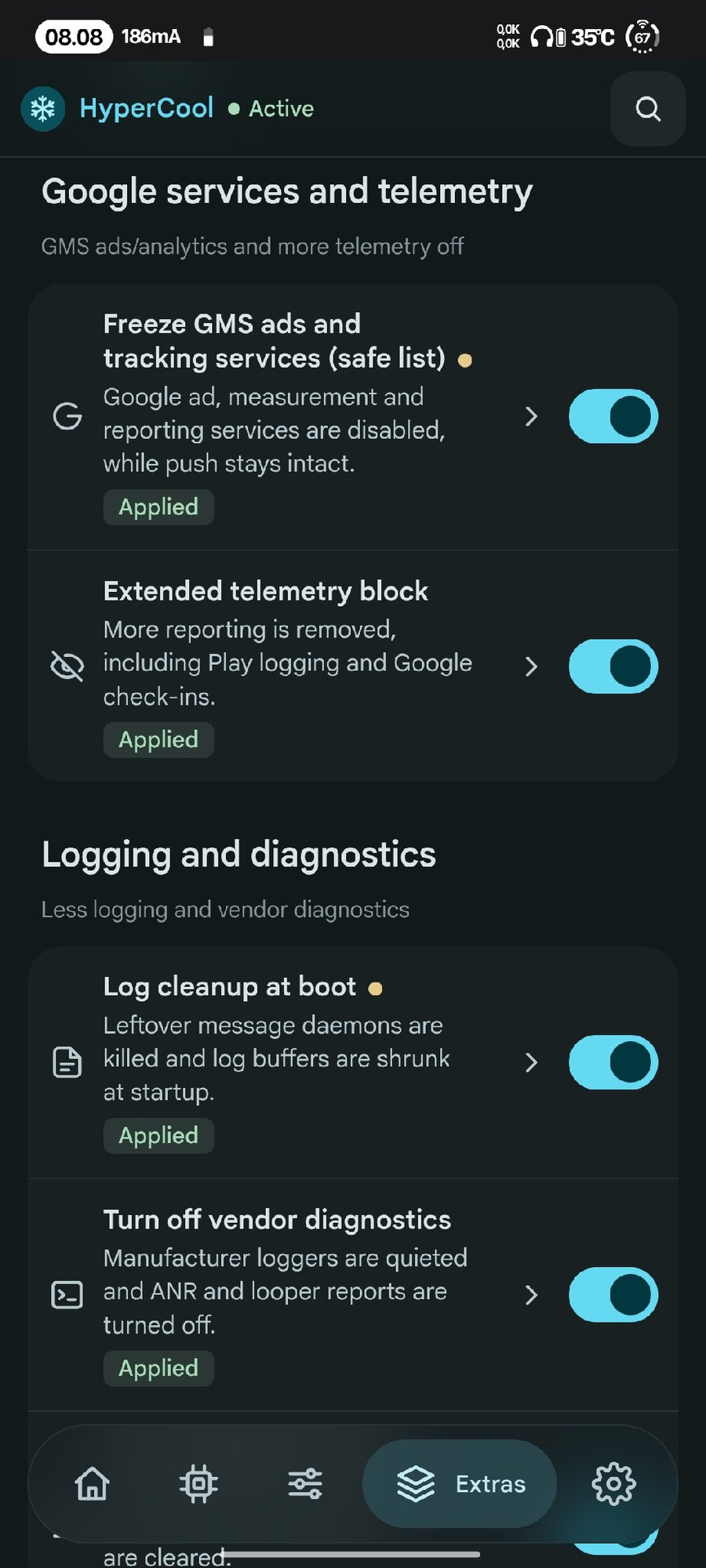
Google services and telemetry
Google services
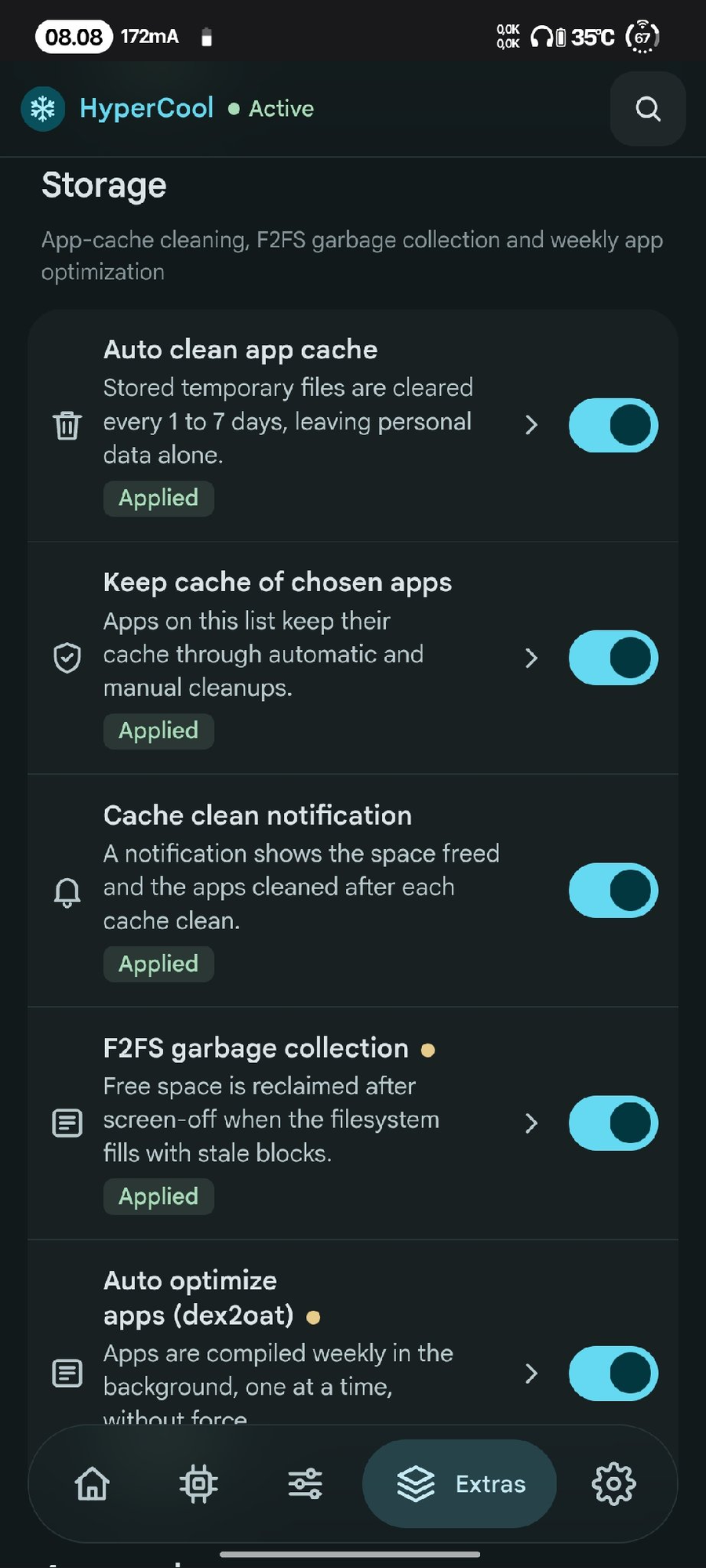
Storage
Storage
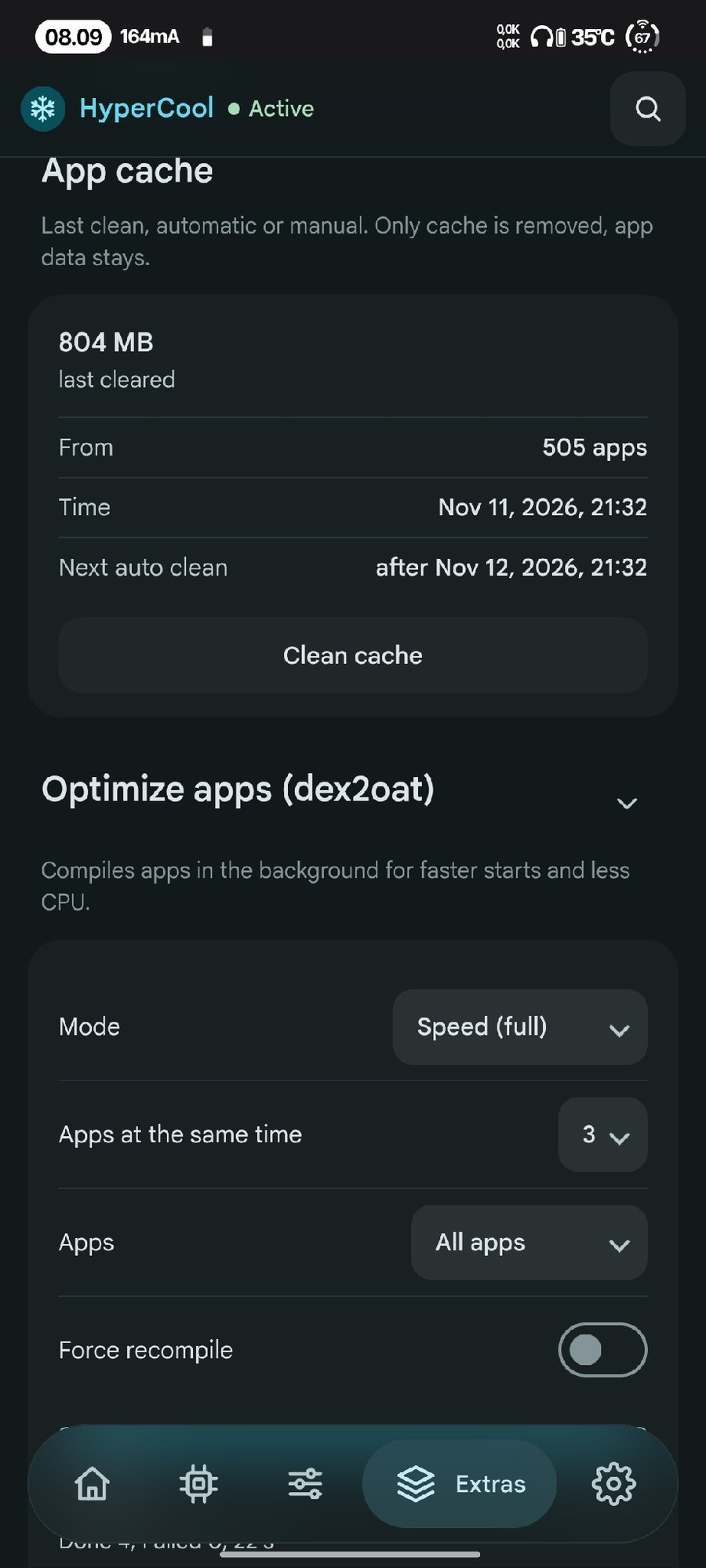
App cache and optimize apps
App cache
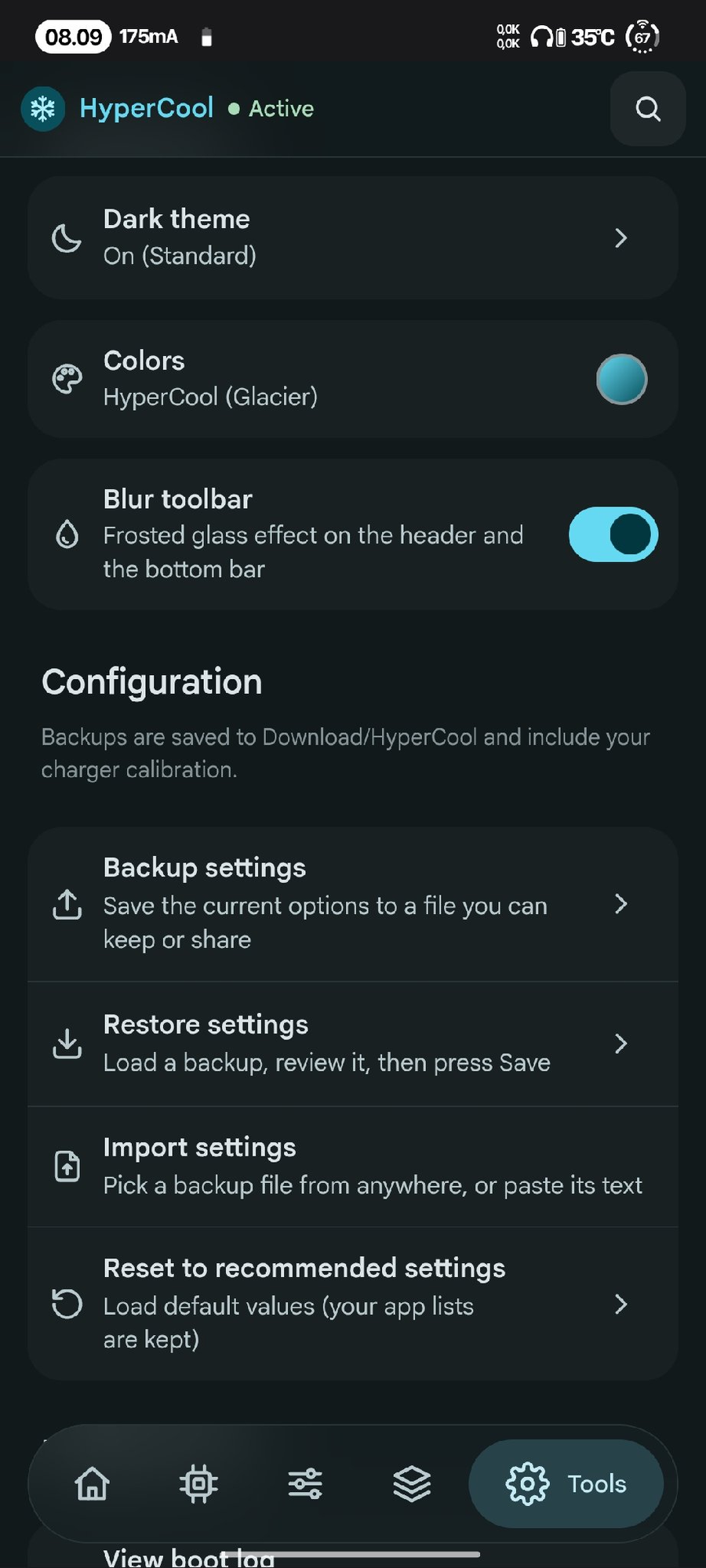
Appearance and configuration
Tools
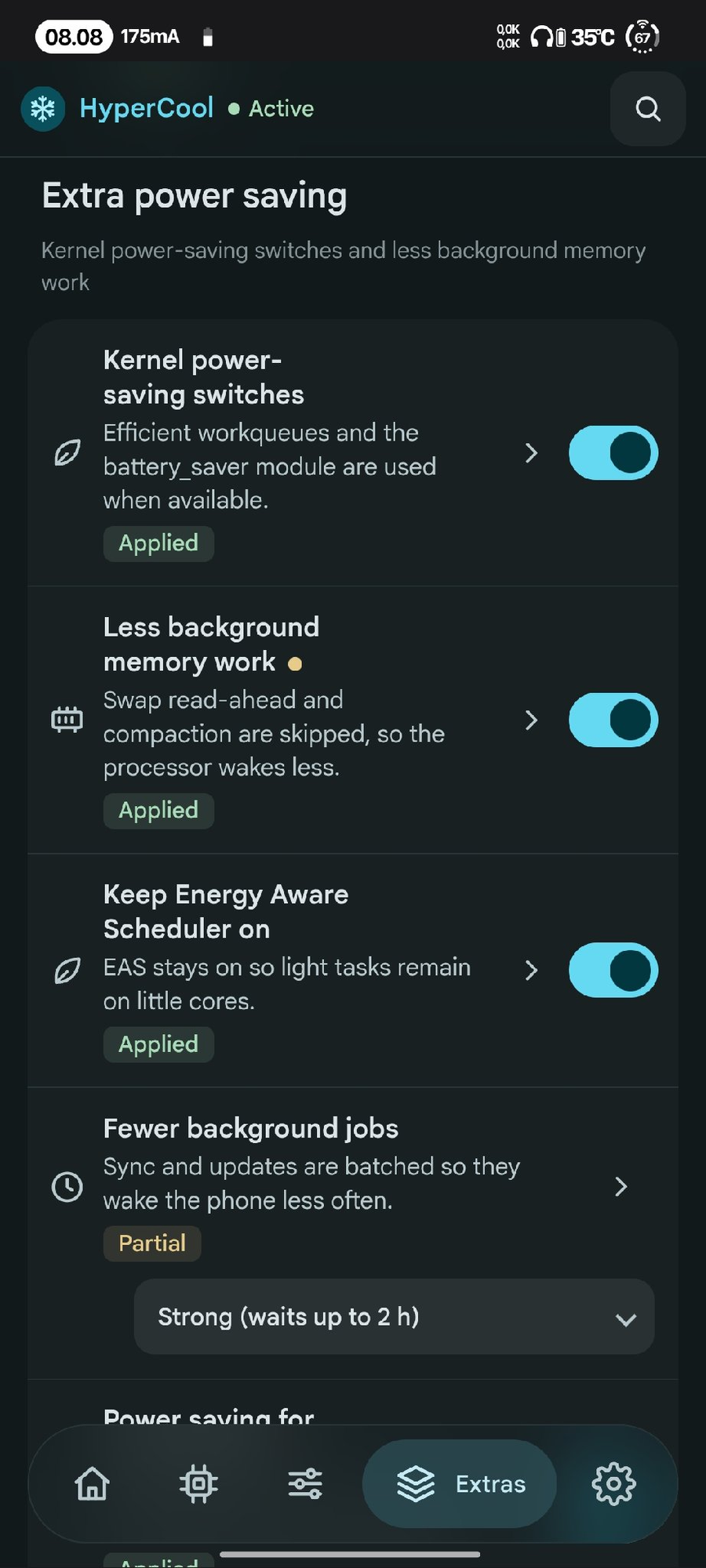
Extra power saving
Extra power saving
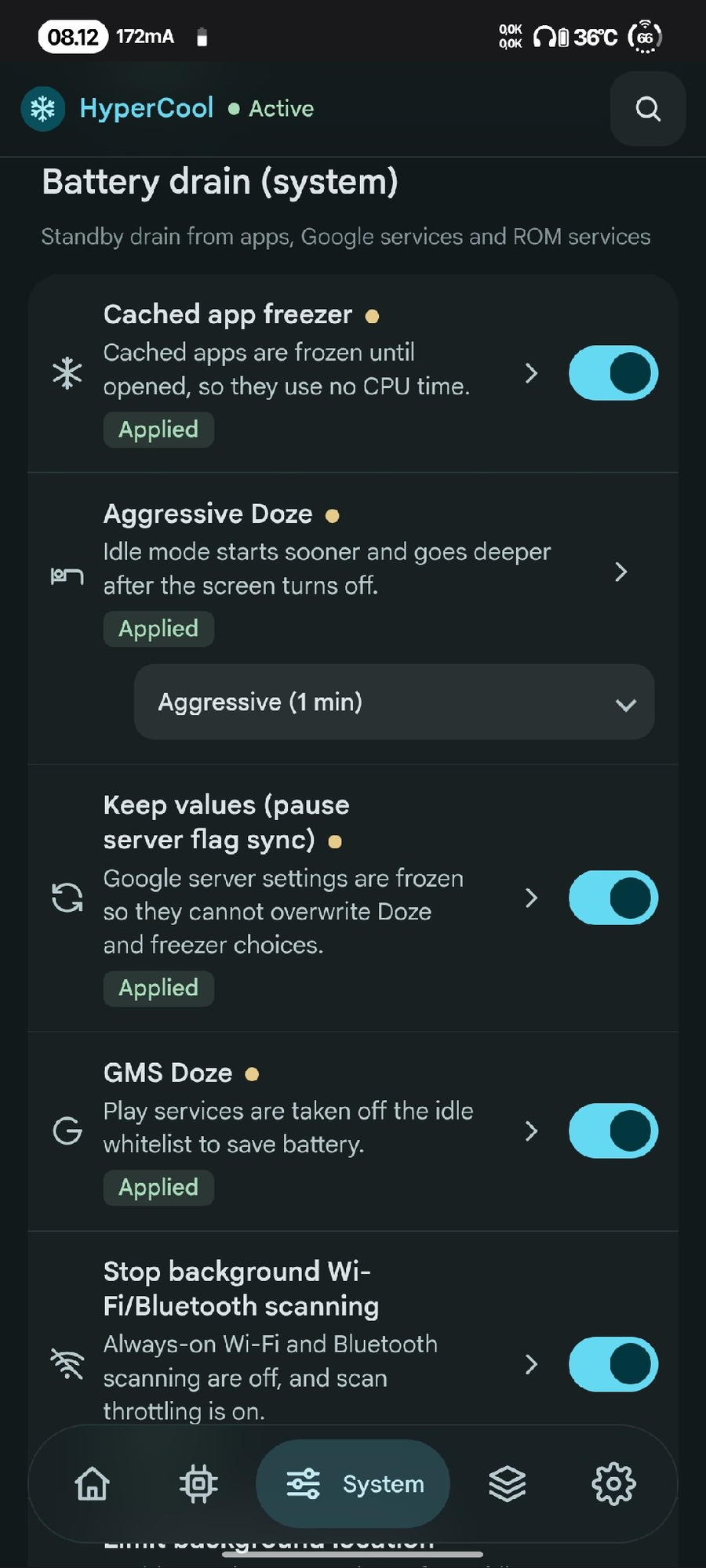
Battery drain (system)

Features

Every feature has its own ON/OFF switch in the WebUI. Changes apply once at boot, and turning a feature off (or uninstalling) restores the original values

Unsupported features are skipped

Heat control

  • CPU big-core frequency cap (with lock)
  • CPU little-core frequency cap (default off, with lock)
  • GPU frequency cap (from your own GPU table, with lock)
  • GPU power collapse
  • Less aggressive CPU governor (WALT / schedutil)
  • Disable kernel touch boost
  • Background apps on little cores
  • Park prime core (Qualcomm; switches core_ctl on when the kernel has it off, checks that the core is really parked, locks the nodes)
  • CPU keeper: keeps the big/little caps and the prime parking in place when the ROM undoes them
  • Disable UI blur
  • Cooler charging (current limit) and charge limit ~80% (Xiaomi)

Battery drain (kernel)

  • Adaptive screen-off power profile
  • Deep CPU sleep, UFS power saving
  • Fewer writeback wakeups, less I/O accounting
  • Turn off kernel debug, kernel wakelock blocker
  • Keep Wi-Fi on while the screen is off (turns it on again when the ROM switches it off; Wi-Fi you switch off yourself stays off)
  • Location and Bluetooth off after a long screen-off (both come back when the screen turns on; off by default)
  • Mobile data and NFC off during screen-off (back on when the screen turns on; waits during calls, audio and hotspot; off by default)
  • Screen-off drain check: the drain of each screen-off period of 30 min or more in Recent activity, a notification when it is high (1 h or more, 2% or more lost, from the rate you pick), and, when the drain was 1%/h or more, the user app that held wake locks the longest, with a button to block it in the background; periods with the charger plugged in part of the time are left out (off by default)
  • Heat guard (experimental, off by default): lower refresh rate and big-core limit while the battery is hot, back after it cools down
  • Recent activity on Home: the 3 newest events, and Show all with filters (All, Keepers, Manual, Idle drain) for the last 50: boot result with the features that failed, saved setting changes, cache clean, app optimization, F2FS cleanup, heat guard, keepers that stopped and why, Revert and restore, screen-off drain per period and daily idle drain from Android's battery stats. High drain and failed work are coloured
  • Keeper status on Home: a small table (tap to open) with every background keeper, Running / Off / Not running / Skipped / Failed, its pid, state and last event
  • F2FS garbage collection with the screen off (Storage; frees space that only GC can give back; once a week at most, no charger needed; off by default)
  • Auto optimize apps (dex2oat) once a week with the screen off (Storage; speed-profile, no force recompile, result as a notification; off by default)
  • Top battery use (Home; read only: user apps, system apps, system services and hardware, from Android battery stats)

Apps

  • Keep important apps alive
  • Restrict other user apps
  • Block apps in background
  • Disable apps (pick with care)

Battery drain (system)

  • Cached app freezer, aggressive Doze, GMS Doze
  • Wi-Fi/BT scanning off, limit background location, network standby saving
  • App Standby, less stats, telemetry off
  • Disable analytics & ad packages, Joyose off, less logging

Long battery

  • Stronger Battery Saver, auto saver level
  • Dim screen on Battery Saver, Smart Pixels (ROMs that have it)
  • Refresh rate cap, adaptive refresh rate (high on touch, low when idle), animation scale

Extras

  • Scheduler, network and I/O tuning
  • MiGT / Metis off (Xiaomi)
  • Balanced system defaults, common kernel tuning
  • RAM optimizer, multitasking profile
  • ZRAM size & compression (2-8 GB or custom up to 12 GB)
  • GMS ads/analytics freeze, more telemetry off
  • Log cleanup, vendor diagnostics off
  • Kernel power-saving switches, Energy Aware Scheduler
  • Power saving for idle USB / I2C / SPI devices (opt-in)
  • Fewer background jobs: JobScheduler batches background work for 1-2 hours (Balanced / Strong, read back and put back if the ROM ignores it)
  • Compact background apps: compacts the memory of background apps after the screen has been off, only when free RAM is low
  • Auto clean app cache (every 1 to 7 days), apps that keep their cache, cache clean notification
  • Optimize apps (dex2oat) for all apps with live progress (Extras tab, on demand)
  • Boot notification when everything is applied

Home

  • Search: find any feature by name and jump to it
  • Idle drain: battery drop per hour with the screen off since the last unplug (shows after a 1% drop)
  • Battery check: health, capacity, cycle count, temperature and more
  • Wake sources: which wakeup sources kept the CPU awake or cut its sleep short, in plain names (Mobile data, Wi-Fi, Apps and Android, Android system, Alarms and timers…), with how much of the time the phone was awake since "Mark start"; "Apps and Android" opens the apps that held wake locks (Android battery stats, read with dumpsys batterystats --charged, without the battery history), each with a button to block it in the background
  • CPU use now: the busiest processes over 2 seconds as a share of the whole CPU, in plain names; the measurement and the root manager are left out (read only)
  • Battery calibration: guided full cycle (5% → 100% → until charging finishes) so the battery % is accurate (optionally deletes batterystats.bin)

Requirements

  • Android 11+
  • KernelSU, KernelSU Next or APatch (Magisk: open the WebUI with MMRL or KsuWebUI)
  • Qualcomm or MediaTek SoC, any ROM

Files

  • /data/adb/hypercool/config.conf settings
  • /data/adb/hypercool/status.conf last boot result
  • /data/adb/hypercool/boot.log log
  • sh /data/adb/hypercool/restore.sh --all restore every system change by hand

Credits

  • Frosty by Drsexo
  • Power Saver Pro by @ShastikXD & @TempMeow (some code by @kveld9)
  • Hyper Optimize by Tatsh
  • Xtreme Battery Saver (DethByte64), Universal GMS Doze, sysconfig-patcher
  • WebUI Mono theme: design inspired by Duck ToolBox by Eltavine (MIT)
  • WebUI reference: Specter by @dpejoh1

Support

Note

If HyperCool is useful to you, consider supporting development:

Support me on Ko-fi

Other ways to support: SociaBuzz · QRIS

Telegram channel

Disclaimer

HyperCool changes kernel and system settings. Use it at your own risk; the author is not responsible for bootloops, data loss or damage. Make a backup first, and turn features off one by one if something misbehaves. Provided without any warranty (see the GPL).

License

GPL-3.0-or-later. Copyright (C) 2026 Yudharn. See LICENSE. Modified versions must stay GPL-3.0, keep the source open and keep this copyright notice. Google Sans font: SIL Open Font License (webroot/GoogleSans-OFL.txt).

历史版本

v2.3.7

最新 HyperCool v2.3.7

版本代码 237 v2.3.7

下载
  • New: Wake sources report: kernel wakeup statistics in plain names (Mobile data, Wi-Fi, Apps and Android, Android system, Alarms and timers, Battery and charging, …), with how much of the time the phone was awake since "Mark start", sorting by awake time or wake-ups, and "Apps and Android" opening the apps that held wake locks. Read only.
  • New: CPU use now: the busiest processes over 2 seconds as a share of the whole CPU, in plain names; the measurement itself and the root manager are left out, and reading /proc uses shell builtins only.
  • New: Screen-off drain check (off by default): each screen-off period of 30 min or more without the charger is logged in Recent activity, with a notification when the drain is high (1 h or more, 2% or more lost, at the rate you pick) and the user app that held the most wake locks when the drain was 1%/h or more.
  • New: drain_alert, drain_alert_rate, drain_alert_notify, drain_cause and drain_cause_min in the WebUI, read live by the keeper. App wake-lock rows and drain lines also get a "Block in background" button.
  • Changed: stats_reduce now also turns off activity and foreground-service start logs and the disk stats logging job.
  • Changed: the app wake-lock list reads dumpsys batterystats --charged (text, without the battery history), counts only per-uid partial wake locks, and gets package names from cmd package list packages -U.
  • Changed: the screen-off drain check is off by default for new installs.
  • Fixed: a charger plugged in during a screen-off period is detected from Android's battery_status events (with wake-up checks as a fallback), so those periods are left out even when drain_cause is off.
  • Fixed: the drain check reads battery stats in the background with its own per-period mark (wk.chk.<n>), so a slow dumpsys never holds the keeper and a quick screen-off cannot clear its mark.
  • Fixed: the module description reports "screen-off keeper running" when drain_alert is the only active keeper feature, and no drain line is logged when the drain check is off.

文件 1

HyperCool_v2.3.7.zip 371.4 KiB

SHA-256 807a2b8acf8144b9a25045433e911265297732e4d5e4f6a745350deea8b95d1c · Attestation

v2.3.6

HyperCool v2.3.6

版本代码 236 v2.3.6

下载
  • Changed: The WebUI now always uses the Mono look. The Mono theme switch is gone, and Colors changes only the accent used by switches, buttons, the active tab and icons; backgrounds and text stay black and white.
  • Changed: Each accent color now has its own dark and light palette. System (Dynamic) uses the wallpaper palette, or the preset closest to the wallpaper color, with Blue as the fallback for a grey wallpaper.
  • Changed: Existing theme settings migrate automatically. Mono on or the old Glacier color becomes Mono, a color chosen with Mono off stays as the accent, new installs follow the system dark/light setting, and installs that already used the WebUI keep the Dark default.
  • New: Tapping "N unsaved changes" opens a review with every changed setting and its old to new value before Save.
  • Changed: "Saved, restart to apply" hides after 5 seconds; tap the "Restart to apply" pill in the header to show the bar again.
  • New: Temperature, idle drain and battery health show a loading placeholder until their first reading arrives.
  • Changed: The "Applies after restart" tag now has an icon, the old risk dot is gone, and the risk line is shown in the feature details.
  • New: More feature details explain how the option works, including CPU idle states, UFS power saving, I/O accounting, Wi-Fi/Bluetooth scanning, network standby, telemetry, logging, Battery Saver trigger, refresh rate, animation scale, apply delay, boot notification, network stack tuning, cache-clean notification and background memory work.

文件 1

HyperCool_v2.3.6.zip 353.5 KiB

SHA-256 3511c880f82002c372461e5db2640c6759d1c01b7216f8dba1d4cfa3216d7f3f · Attestation

v2.3.5

HyperCool v2.3.5

版本代码 235 v2.3.5

下载
  • New: Keeper status on Home: a tap-to-open table with every background keeper, its Running / Off / Not running / Skipped / Failed state, pid, detail and last event.
  • New: Show all activity view with All, Keepers, Manual and Idle drain filters. The 3 newest events stay on Home, and high drain or failed work is coloured.
  • New: The activity log keeps the last 50 events (was 30) and now includes the boot result with the features that failed or were partial, saved setting changes, and Revert and restore actions.
  • New: Screen-off drain is recorded for each screen-off period of at least 30 minutes, and daily idle drain history comes from Android's battery stats.
  • Changed: Keepers record why they stopped; the guard records restores when the module is disabled; stop events are skipped during reboot and shutdown to keep the log clean.
  • Changed: The heat guard records a late application once, notes why it stopped, and no longer writes a cool-down line for a hot period that lowered nothing.

文件 1

HyperCool_v2.3.5.zip 350.5 KiB

SHA-256 ba73b37e0602c48dc45785b9ef2136ae24088c9d3938f24224cc12e00faa1872 · Attestation

v2.3.4

HyperCool v2.3.4

版本代码 234 v2.3.4

下载
  • New: Heat guard (experimental, off by default) lowers the big-core CPU cap and the refresh rate while the battery is hot, then restores both after cool-down. Applied limits are also put back when the keeper stops, on reboot, when the module is disabled, or on uninstall.
  • New: rr_hold (1–5 s, default 2 s) replaces the fixed 2 s idle delay of the touch refresh keeper.
  • New: Recent activity on Home lists keeper actions, including CPU cap, charge limit, cache clean, calibration, screen-off, F2FS, dex2oat, and manual cache/RAM actions. It refreshes automatically when Home opens or becomes visible again, and the manual Refresh button is gone.
  • Changed: the existing tuning lists now include scheduler RT clamp, quiet-kernel entries, RAM compaction and page-cluster, more props, an extra GMS freeze component, and four more Dropbox tags. WebUI descriptions list the new entries.
  • Changed: joyose_off moved to the experimental risk group.
  • Fixed: invalid battery temperatures such as -, --, and 1-2 are rejected, so a hot CPU cap is not kept when the temperature cannot be read.
  • Fixed: with Adaptive refresh rate on, the heat guard also lowers min_refresh_rate when it is above the heat cap and restores it after cool-down.
  • Fixed: WebUI no longer downgrades cfg_ver when loading or importing a config from a newer build.
  • Fixed: "Battery hot" is logged only when a limit was actually lowered, and the cool-down log no longer ends with an empty detail.
  • Fixed: Wi-Fi pause and failure logs use titles that match the event, and module status only reports "heat guard running" when the keeper is applied or partial.

文件 1

HyperCool_v2.3.4.zip 344.2 KiB

SHA-256 befc42059dcc672d5c3ff7d66552d4ce15792678b4bfa1dd91f53dcbdc47ebc4 · Attestation

v2.3.3

HyperCool v2.3.3

版本代码 233 v2.3.3

下载
  • Changed: battery-tuned defaults for 12 numeric inputs (cpu_cap 95 to 88, gpu_idle_timer 64 to 20, walt_hispeed_load 95 to 99, walt_up_rate 1000 to 5000, bg_uclamp 30 to 25, soff_cpu 60 to 30, soff_radio_min 15 to 5, soff_data_min 10 to 5, vm_writeback 3000 to 6000, vm_stat_interval 10 to 60, vm_dirty_bg 10 to 20, vm_dirty 30 to 40). Feature switches and levels are unchanged.
  • New: adaptive refresh rate uses the panel's highest Hz while active and lowest Hz while idle (1 Hz on LTPO), with manual overrides and a 90/30 fallback.
  • Changed: updating the module applies the new battery defaults only where the value is still the old default, so user changes are kept (cfg_ver 4).
  • Fixed: Location restore returns the saved location_mode even when Location is already on, and the Wi-Fi scan-off and Doze writes are verified by reading them back.
  • WebUI: Source code link added after Telegram, and the soff_radio and scan_off descriptions match the module.

文件 1

HyperCool_v2.3.3.zip 334.1 KiB

SHA-256 0e736c3e50b8a44cd46329025c7f6183fa855e94f68efa202a847edc6470f067 · Attestation

v2.3.2

HyperCool v2.3.2

版本代码 232 v2.3.2

下载
  • Fixed: Mobile data and NFC off during screen-off is more reliable now: call detection checks every SIM slot, tethering is detected from the current state instead of the event log, NFC "turning" is handled while restoring, and radios are saved before switching with failed switches undone.
  • WebUI: the Mono theme title is bold.

文件 1

HyperCool_v2.3.2.zip 326.2 KiB

SHA-256 cd1fd75d8882375544974a129ee4647dae6fccc04f60e26f53b3f6fbf73c40b7 · Attestation

v2.3.1

HyperCool v2.3.1

版本代码 231 v2.3.1

下载
  • WebUI: the Mono theme status pills are neutral now, the applied state uses the normal text colour, and the partial state uses a dashed outline. Added matching warning/ok state colours for the Mono theme.
  • WebUI: the Extra block I/O tuning card now opens its details panel, so "What it changes" is visible.
  • WebUI: Clean cache and Clean RAM now use the primary button style.

文件 1

HyperCool_v2.3.1.zip 326.0 KiB

SHA-256 9b60105587a950d104edd544b7382c2d7d345af0ed480593423052d0fbcc86da · Attestation

v2.3.0

HyperCool v2.3.0

版本代码 230 v2.3.0

下载
  • New: WebUI Mono theme. Appearance > Mono theme switches to a neutral black and white look with the system font, rounded cards and lists. The Colors option is disabled while Mono is on. Design inspired by Duck ToolBox by Eltavine (MIT).
  • New: Mobile data and NFC off during screen-off (off by default). After the configured delay, mobile data and NFC are switched off while the screen is off and come back when it turns on. It waits during calls, audio playback and tethering.
  • WebUI: the Allow deep CPU sleep card now opens its details panel, so Last boot and What it changes are visible.

文件 1

HyperCool_v2.3.0.zip 325.8 KiB

SHA-256 18beb89d27a5d1e92b0ddc03fb559025b0d9908c885d1bd25a14f7060cf3fa5c · Attestation

v2.2.6

HyperCool v2.2.6

版本代码 226 v2.2.6

下载
  • Fixed: the F2FS GC wake-lock timeout overflowed mksh's 32-bit arithmetic and became negative, so the kernel rejected it. The timeout is now written correctly.
  • Fixed: Location could stay off after the screen turned on when the ROM ignored the location command but accepted the location_mode fallback. The old mode is now restored immediately if the switch cannot be completed, instead of leaving Location off without a restore record.
  • Fixed: Create bug report reported "Report failed" after saving when boot.log did not exist yet.
  • Fixed: Auto optimize apps treated battery temperatures below 0 °C as unreadable and stopped with "too warm".
  • Fixed: the Max battery preset description claimed that Bluetooth was turned off; the preset only turns Location off. The Bluetooth option now also mentions that a smartwatch or fitness band loses its connection while Bluetooth is off.
  • Fixed: uninstall.sh could not find the module files when started as sh uninstall.sh from inside the module directory.
  • Changed: the Max battery preset now also sets the Little-core frequency cap to 80%.

文件 1

HyperCool_v2.2.6.zip 321.0 KiB

SHA-256 7b22c2501e59092e584afd5d30709032c4193473c5b5e51dcaa59fb6afae196f · Attestation

v2.2.5

HyperCool v2.2.5

版本代码 225 v2.2.5

下载
  • Fixed: ZRAM keeps priority -2 when possible. The module tries swapon -p -2, checks the live value in /proc/swaps, and falls back to the kernel default; the status names the swap that already holds -2 instead of claiming it.
  • Fixed: the background-app compaction check no longer overflows on large-RAM devices, and battery calibration skips an unreadable temperature instead of calculating with it.
  • Fixed: GMS Doze reports off/failed when its whitelist cannot be restored, and a manual app optimization run releases its wake lock after 12 hours at most.
  • Fixed: Runtime power detects input devices correctly when only one input glob matches; the RAM optimizer status no longer claims ZRAM tuning.
  • Fixed: Keep Wi-Fi on counts every attempt for its limiter, but only reports a re-enable when Wi-Fi is really on.
  • WebUI: Home stats use tabular monospace numbers, and the cache details describe the real measured paths and keep-list behavior.

文件 1

HyperCool_v2.2.5.zip 320.8 KiB

SHA-256 fb1ffdd72a0ef3879f17315c2adf9a520909ff19177679336e2fe6fac9eccb8b · Attestation

透明度

Tag
v2.3.7 不可变 Release
Tag commit
1bc67ef12776
内容 commit
1bc67ef12776
SHA-256
807a2b8acf8144b9a25045433e911265297732e4d5e4f6a745350deea8b95d1c
最近同步到变更

自行复核

KernelSU 模块不对模块签名,也不审计模块代码。SHA-256 只证明下载内容与本索引一致。可使用 GitHub CLI 自行复核:

gh release verify v2.3.7 -R yudharn/HyperCool
gh release verify-asset v2.3.7 HyperCool_v2.3.7.zip -R yudharn/HyperCool