

🎮 COPG
The most advanced device & CPU spoofer for Android — bypass restrictions and unlock premium graphics, higher FPS and exclusive features on most games and apps.









✨ Why COPG?
COPG is a Zygisk module that makes most games and apps believe they are running on a different, fully‑featured flagship device — unlocking the high‑FPS modes, HD graphics and premium tiers that are otherwise gated to specific hardware. It pairs that with a CPU spoofer, a userspace comfort‑tweak controller, and a beautiful on‑device WebUI to manage everything — all without rebooting.
🎯 Device SpoofingPer‑app device profiles (brand, model, fingerprint, SDK, baseband, per‑app serial and 12 extra Build fields) so each game sees the exact flagship it rewards. ⚙️ CPU SpoofingSpoof the CPU to flagship‑class silicon for apps that gate features on the chipset. 🎨 GPU Spoofing (PRO · opt‑in)Spoof the GPU — OpenGL renderer/vendor & Vulkan device name — per app for games that gate graphics on the chip. GPU spoofing is a PRO feature (unlocked with a license). It’s a resident hook, so it sits behind a clear use‑at‑your‑own‑risk gate — never enable it for anti‑cheat games. 🖥️ Refresh‑Rate Spoof (free)Make an app read a custom display refresh rate (e.g. 120 / 144 / 165 Hz) — the current rate and the full supported‑modes list — for device‑info apps and games that show or gate on the panel’s Hz. Resident hook behind a use‑at‑your‑own‑risk gate — never for anti‑cheat games. 📡 IMEI & Device ID (PRO)Fake the IMEI / device ID — per app, or device‑wide with the new Global IMEI (hooks the
phone service so Settings, 🔒 DRM / Widevine (PRO)Report a higher Widevine security level (L1 / L2 / L3) and spoof the DRM device & system ID for apps that gate or display it. 🌍 Timezone & Language (free)Give each app its own timezone and its own language / region (BCP‑47) — apps read and even render in the fake locale. Applied the stealth, system‑side way, so nothing loads into the app. ⏱️ Fake Uptime (PRO)Make an app think the device has been running for days — shifts both the Java and native uptime readers, useful against anti‑fraud / referral flows that distrust a freshly‑reset device. 🌐 WebView User‑Agent (PRO)Give any WebView‑based app its own browser User‑Agent — from a reusable named profile — for sites and in‑app pages that gate content, layout or pricing on the browser identity. |
🧬 Prop Spoofing & Android IDStealth copy‑on‑write prop spoof (fingerprint, build props & more) (PRO) and per‑app Android ID (PRO) — both are stealth: the module unloads before the game runs, so nothing of COPG stays mapped in memory — safe even for anti‑cheat games. (CPU spoof, device profiles, Build/serial fields and block‑CPU stay free.) 📶 SIM / Carrier Spoofing (PRO)Make an app read a different network carrier — name, operator code (MCC/MNC) & country — per app, even a different carrier per SIM slot. Safe mode is fully stealth (anti‑cheat safe); Aggressive mode also covers the newer subscription API but is resident (opt‑in, never for anti‑cheat games). 🆔 Per‑App Advertising ID (PRO)Give each app its own Google Advertising ID — automatic per‑app, or pin an exact UUID — for ad / reward / referral / multi‑account apps where each install should look like a different device. 🧩 Per‑App App Set ID (PRO)Give each app its own Google App Set ID — the resettable fingerprint signal ad / analytics SDKs read via Play Services — automatic per‑app, or pin an exact UUID, so each looks like a separate device. It’s a resident hook behind a use‑at‑your‑own‑risk gate — never for anti‑cheat games. 🛡️ Privacy HidesHide VPN — covers both the Java (network‑interface / capabilities) and native interface checks, pairip‑safe (free) · Mock‑Location hide (PRO) · Hide Developer Options + USB debugging (free) — pass the checks that banking & privacy‑sensitive apps run. 🎛️ Per‑App Comfort TweaksAuto Do‑Not‑Disturb, disable auto‑brightness, keep screen on, stop logging and a per‑app screen DPI — applied only while a tagged game is active, then restored. |
🔁 Add or remove devices, games & apps without a reboot. ✨ Fully customizable. 🌍 9‑language WebUI with Light / Dark / AMOLED themes.
🚀 Maximize Your Gaming
| Game | Unlock |
|---|---|
| Call of Duty Mobile | 120 FPS (BR / MP) |
| PUBG Mobile / BGMI | 120 FPS · Haptic Feedback |
| Delta Force | 120 FPS · HD Graphics |
| Free Fire / Free Fire MAX | 144 FPS |
| Mobile Legends: Bang Bang | 144 FPS |
| Fortnite | 120 FPS |
| Asphalt 9 | 120 FPS |
| Farlight 84 | Max Graphics |
| Arena Breakout | 90 / 120 FPS |
| Honor of Kings | High‑FPS mode |
| …and 69+ more | Premium tiers unlocked |
📱 App Enhancements
- TikTok — stream in full 1080p
🖼️ Screenshots

Dashboard · System info |

Library · Packages |

Per-App · Spoof toggles |

GPU · Profile editor |
📦 Installation
Requirements
- A rooted Android device (9.0+)
- One root solution + a Zygisk implementation:
| Root | Min version | Zygisk |
|---|---|---|
 |
24 | Zygisk Next · ReZygisk · NeoZygisk |
 |
0.6.6 | Zygisk Next · ReZygisk · NeoZygisk |
 |
0.10 | Zygisk Next · ReZygisk · NeoZygisk |
Important
Standard / built‑in Magisk Zygisk is not supported (not safe). Use one of the Zygisk implementations above.
Get the module

Install from MMRL, or grab the latest
COPG.zip from Releases.
Steps
- Download the latest
COPG.zipfrom Releases. - Install via your root manager → Modules → Install from storage → select the ZIP.
- Reboot.
- Verify it shows up in your root manager (look for ✨ COPG spoof ✨).
- Open the module’s WebUI to manage devices, games and tweaks.
🖥️ WebUI
A no‑reboot, on‑device control panel built into the module. On KernelSU and APatch it opens straight from the manager. On Magisk, install the KSU WebUI app and open COPG from there.
- 📋 Library — add & manage device profiles and per‑app spoof lists with search, sort & filters
- ➕ Add Package — pick any installed app, choose a device profile, toggle CPU / GPU / SIM / Prop / Android ID / Advertising ID (GAID) / App Set ID / DRM / IMEI / Timezone / Language / WebView User‑Agent / Fake Uptime / Mock‑Location / Hide VPN / Hide Developer Options and the DND / Auto‑Brightness / Keep‑Screen‑On / Screen‑DPI tweaks
- 📊 Dashboard — live system info: Android, ABI, Zygisk variant, root & kernel
- 🆔 Advertising ID — view, randomize, set a custom one or restore your real ID (Settings · free)
- 📡 Global Hooks — device‑wide Global IMEI (Settings): one fake IMEI for every app,
*#06#and the dialer - 💾 Backup / Restore & Sync from GitHub
- 🎨 Light / Dark / AMOLED themes · 🌍 9 languages (EN, FA, AR, DE, ES, ID, TH, TR, ZH)
⚙️ Advanced — edit profiles by hand
The WebUI is the recommended way to manage profiles, but you can also edit
/data/adb/modules/COPG/COPG.json directly:
{
  "PACKAGES_REDMAGIC_9_PRO": [
    "com.mobilelegends.mi",
    "com.supercell.brawlstars:with_cpu"
  ],
  "PACKAGES_REDMAGIC_9_PRO_DEVICE": {
    "BRAND": "ZTE",
    "MODEL": "NX769J",
    "FINGERPRINT": "ZTE/NX769J/..."
  }
}
Package tags are colon suffixes — e.g. :cpu=<model> (CPU spoof + pick the chip),
:gpu=<model> (GPU spoof + pick the GPU), :cow (prop spoof), :aid (Android ID),
:serial (per‑app serial), :gaid (Advertising ID), :appset (App Set ID), :drm (Widevine),
:imei (IMEI), :sim=<carrier> / :simx=<carrier> (SIM · safe / aggressive), :tz=<zone> (timezone),
:lang=<bcp47> (language / region), :ua=<profile> (WebView User‑Agent), :uptime=<sec> (fake uptime),
:mock (mock‑location hide), :vpn / :vpns (VPN hide), :hidedev (hide developer options),
:blocked (force real CPU), :dnd / :dab / :kso / :nolog / :dpi=<n> (comfort tweaks).
❓ FAQ
🤔 What does COPG stand for?
Originally CO (Call of Duty) + PG (PUBG) — the two games it was first built for. It now supports most games and apps, but the name is kept for its history.
📌 Will this get me banned?
COPG is designed to be undetectable, but safety can't be guaranteed. Use at your own risk.
⚡ Does it affect performance?
Minimal. The spoof runs only at app launch and doesn't touch in‑game performance.
🔧 How do I open the WebUI?
On KernelSU and APatch, open it straight from the manager. On Magisk, install the KSU WebUI app and open COPG from there.
💬 Community


🌐 Translations are community‑driven. Only English & Persian are maintained by the author — PRs for the other languages are very welcome!
₿ Support COPG
COPG is developed in my spare time and given away free. If it leveled up your games, please consider supporting with any amount you wish — every bit is real motivation for stronger, continued development. And a ⭐ on GitHub helps a lot too!
| Network | Address |
|---|---|
 |
0xB8eb7Ea033823C9aA4616B0648B89CDbC931BAAd |
 |
TMMDAyJ9Fs3yQpidd2Q4eYLTMkM1hsrauV |
 |
0xB8eb7Ea033823C9aA4616B0648B89CDbC931BAAd |
 |
UQAOHoREeGeJ0_kzJpSW3m-6Dlb_lzdHpT1a-gA7NkbuCM8N |
⚠️ Double‑check the network before sending — funds sent on the wrong chain can be lost.
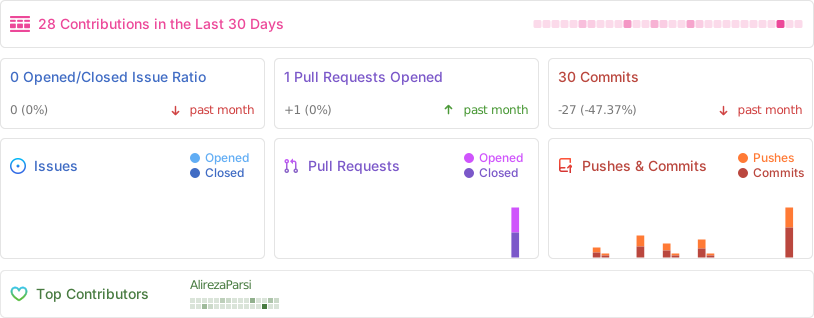
📈 Activity
If COPG leveled up your games, drop a ⭐ — it really helps!
Made with ❤️ by Alireza Parsi · © 2026 COPG Project
 Aliza
Aliza  Alireza Parsi